大疆Mobile SDK 5.x 实例一
由于大疆新的无人机采用Mobile SDK 5.x版本(Kotlin),而之前学习的版本是4.x(Java),并且大疆对于5.x版本的文档写的实在不怎么样(相比4.x来说),所以从新记录一下。
获取已集成 MSDK 的空白工程SDKSample.zip,解压用后 IntelliJ IDEA 打开。
应用程序密钥
在 DJI 开发者网站的开发者中心申请 Key 后填入项目,在AndroidManifest.xml中填入 API Key
<application
....
<meta-data
        android:name="com.dji.sdk.API_KEY"
        android:value="你的密钥" />

...
</application>
初始化类库
初始化类库,即在应用程序的 Application 对象中,通过 com.secneo.sdk.Helper 类的 install(Application app)方法注册 Mobile SDK
class MyApplication : Application() {

    private val TAG = this::class.simpleName

    override fun attachBaseContext(base: Context?) {
        super.attachBaseContext(base)
        // 在调用install前,请勿调用任何MSDK相关
        com.secneo.sdk.Helper.install(this)
    }
    // Other methods and logic
}
注册应用程序
override fun onCreate() {
    super.onCreate()
    // 初始化MSDK,建议初始化逻辑放在Application中,当然也可以根据自己的需要放在任意地方。
    SDKManager.getInstance().init(this,object:SDKManagerCallback{
        override fun onInitProcess(event: DJISDKInitEvent?, totalProcess: Int) {
            Log.i(TAG, "onInitProcess: ")
            if (event == DJISDKInitEvent.INITIALIZE_COMPLETE) {
                SDKManager.getInstance().registerApp()
            }
        }
        override fun onRegisterSuccess() {
            Log.i(TAG, "onRegisterSuccess: ")
        }
        override fun onRegisterFailure(error: IDJIError?) {
            Log.i(TAG, "onRegisterFailure: ")
        }
        override fun onProductConnect(productId: Int) {
            Log.i(TAG, "onProductConnect: ")
        }
        override fun onProductDisconnect(productId: Int) {
            Log.i(TAG, "onProductDisconnect: ")
        }
        override fun onProductChanged(productId: Int)
        {
            Log.i(TAG, "onProductChanged: ")
        }
        override fun onDatabaseDownloadProgress(current: Long, total: Long) {
            Log.i(TAG, "onDatabaseDownloadProgress: ${current/total}")
        }
    })
}
App 申请权限
可以参考之前的文章Android App 申请权限
在 MainActivity 接收 MyApplication 的消息
可以参考之前的文章Android 使用 BroadcastReceiver 广播数据
在activity_main.xml 添加如下布局
<?xml version="1.0" encoding="utf-8"?>
<ScrollView xmlns:android="http://schemas.android.com/apk/res/android"
    android:layout_width="match_parent"
    android:layout_height="match_parent"
    android:layout_margin="16dp">

    <LinearLayout android:layout_width="match_parent" android:layout_height="wrap_content"
                  android:orientation="vertical">

        <TextView
                style="?android:listSeparatorTextViewStyle"
                android:layout_width="match_parent"
                android:layout_height="wrap_content"
                android:text="应用程序激活与无人机绑定" />

        <TextView
                android:id="@+id/tv_status_application"
                android:layout_width="match_parent"
                android:layout_height="wrap_content"
                android:gravity="center"
                android:padding="8dp"
                android:text="当前应用程序激活状态:UNKNOWN" />


        <Button
                android:layout_width="match_parent"
                android:layout_height="wrap_content"
                android:id="@+id/btn_flight_controller"
                android:text="飞行控制器" />


    </LinearLayout>

</ScrollView>
效果如下: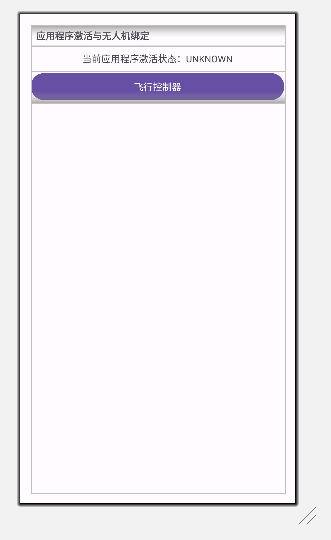
这里的逻辑是,当MyApplication里 MSDK 初始化成功后发送sendBroadcast(Intent(REGISTER_SUCCESS))广播,MainActivity接收到广播后显示当前应用程序激活状态:已激活,然后才能通过点击"飞行控制器"按钮进入下一个活动。
修改MainActivity的代码
class MainActivity : AppCompatActivity(){

    private lateinit var tvAppActivation: TextView

    private lateinit var tvAppActivationState: String

    // 注册一个 BroadcastReceiver 以监听这些操作
    private val registerReceiver = object : BroadcastReceiver(){
        override fun onReceive(context: Context, intent: Intent){
            when (intent.action){
                MyApplication.REGISTER_SUCCESS -> {
                    Toast.makeText(context, "Register Success", Toast.LENGTH_SHORT).show()
                    tvAppActivationState = "已激活"
                    tvAppActivationUpdate()
                }
                MyApplication.REGISTER_FAILURE -> {
                    val errorMessage = intent.getStringExtra("error_message")
                    tvAppActivationState = "未激活"
                    tvAppActivationUpdate()
                    Toast.makeText(context, "Register Failure: $errorMessage", Toast.LENGTH_SHORT).show()
                }

                // Other

            }
        }
    }

    override fun onCreate(savedInstanceState: Bundle?){
        super.onCreate(savedInstanceState)
        setContentView(R.layout.activity_main)

        tvAppActivation = findViewById(R.id.tv_status_application)

        val btnFlightController: Button = findViewById(R.id.btn_flight_controller)

        btnFlightController.setOnClickListener {
            if(tvAppActivationState == "已激活") {
                val intent = Intent(this, FlightActivity::class.java)
                startActivity(intent)
            } else {
                Toast.makeText(this, "应用程序还未激活", Toast.LENGTH_SHORT).show()
            }
        }

        // Other
    }


    private fun tvAppActivationUpdate() {
        runOnUiThread {
            tvAppActivation.text = "当前应用程序激活状态:$tvAppActivationState"
        }
    }

    override fun onDestroy() {
        super.onDestroy()

        // Other
    }

    // Other

}
飞行控制器
创建FlightActivity和对应的视图activity_flight
<?xml version="1.0" encoding="utf-8"?>
<ScrollView xmlns:android="http://schemas.android.com/apk/res/android"
            android:layout_width="match_parent"
            android:layout_height="match_parent"
            android:layout_margin="16dp">
    <LinearLayout android:layout_width="match_parent" android:layout_height="wrap_content"
                  android:orientation="vertical">


        <TextView
                style="?android:listSeparatorTextViewStyle"
                android:layout_width="match_parent"
                android:layout_height="wrap_content"
                android:text="飞行控制" />

        <Button android:layout_width="match_parent" android:layout_height="wrap_content"
                android:id="@+id/btn_takeoff"
                android:text="起飞" />

        <Button android:layout_width="match_parent" android:layout_height="wrap_content"
                android:id="@+id/btn_landing"
                android:text="降落" />

        <Button android:layout_width="match_parent" android:layout_height="wrap_content"
                android:id="@+id/btn_gohome"
                android:text="返航" />
    </LinearLayout>

</ScrollView>
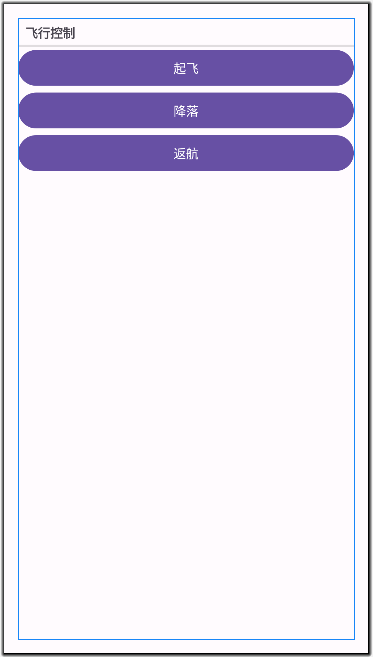
布局效果如下:
class FlightActivity : AppCompatActivity(), View.OnClickListener {

    private lateinit var mBtnTakeoff: Button
    private lateinit var mBtnLanding: Button
    private lateinit var mBtnGoHome: Button

    override fun onCreate(savedInstanceState: Bundle?) {
        super.onCreate(savedInstanceState)
        setContentView(R.layout.activity_flight)


        initUI()
        initListener()

    }

    override fun onDestroy() {
        super.onDestroy()
    }

    private fun initUI() {
        mBtnTakeoff = findViewById(R.id.btn_takeoff)
        mBtnLanding = findViewById(R.id.btn_landing)
        mBtnGoHome = findViewById(R.id.btn_gohome)
    }

    private fun initListener() {
        mBtnTakeoff.setOnClickListener(this)
        mBtnLanding.setOnClickListener(this)
        mBtnGoHome.setOnClickListener(this)
    }

    override fun onClick(v: View) {
        when(v.id) {
            R.id.btn_takeoff -> {
                takeoff()
            }
            R.id.btn_landing -> {
                landing()
            }
            R.id.btn_gohome -> {
                goHome()
            }
        }
    }

    // 获取键值管理器
    private fun getKeyManager(): KeyManager {
        return KeyManager.getInstance()
    }

    // 起飞
    private fun takeoff(){
        getKeyManager().performAction(KeyTools.createKey(FlightControllerKey.KeyStartTakeoff),
            object : CommonCallbacks.CompletionCallbackWithParam<EmptyMsg> {
                override fun onSuccess(msg: EmptyMsg) {
                    showToast("起飞成功 $msg")
                }

                override fun onFailure(p0: IDJIError) {
                    showToast("起飞失败 $p0")
                }
            })
    }

    // 降落
    private fun landing(){
        getKeyManager().performAction(KeyTools.createKey(FlightControllerKey.KeyStartAutoLanding),
            object : CommonCallbacks.CompletionCallbackWithParam<EmptyMsg> {
                override fun onSuccess(msg: EmptyMsg) {
                    showToast("降落成功 $msg")
                }

                override fun onFailure(p0: IDJIError) {
                    showToast("降落失败 $p0")
                }
            })
    }

    // 返航
    private fun goHome(){
        getKeyManager().performAction(KeyTools.createKey(FlightControllerKey.KeyStartGoHome),
            object : CommonCallbacks.CompletionCallbackWithParam<EmptyMsg> {
                override fun onSuccess(msg: EmptyMsg) {
                    showToast("返航成功 $msg")
                }

                override fun onFailure(p0: IDJIError) {
                    showToast("返航失败 $p0")
                }
            })
    }

    // 在主线程中显示提示
    private fun showToast(message: String) {
        runOnUiThread {
            Toast.makeText(applicationContext, message, Toast.LENGTH_LONG).show()
        }
    }

}
打包运行程序,等待程序激活后进入飞行控制界面,点击起飞降落等功能即可控制无人机的起飞降落等
评论已关闭