在Codeigniter框架中使用ajax来显示table和pagination
前情提要
请先了解Codeigniter框架中的分页
列表视图控制器
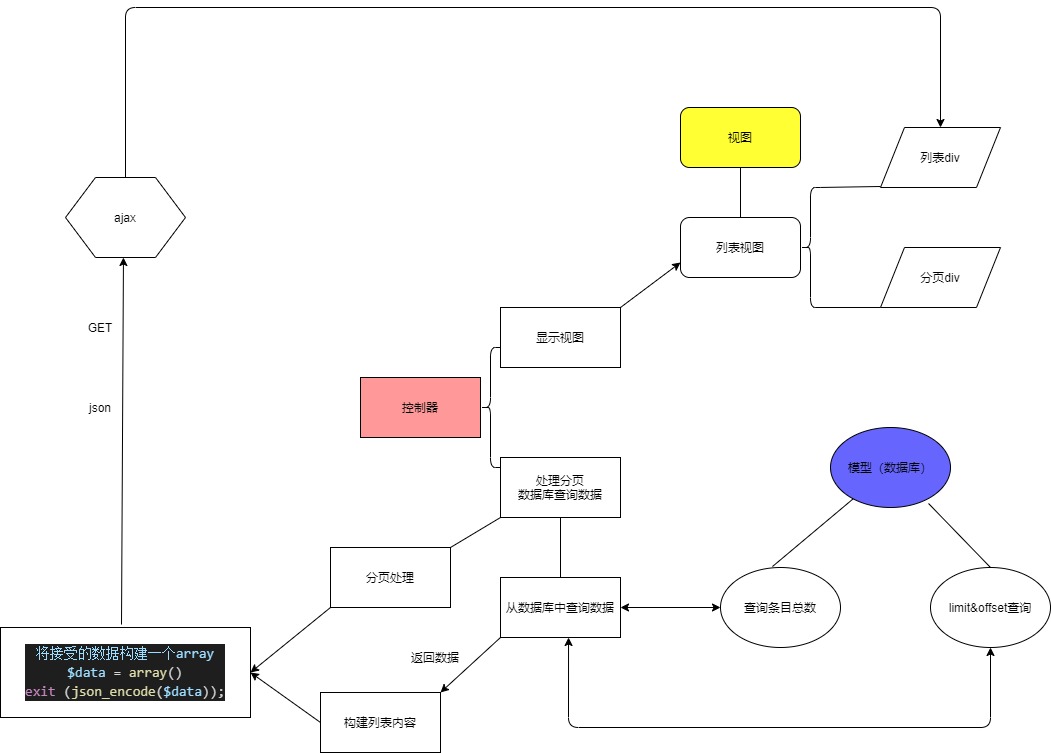
先从控制器开始,控制器分为两个,一个显示列表视图,一个从数据库获取列表和处理分页,本文以系统管理员列表为例
// 显示列表的控制器
public function admin()
{
    // 页面标题
    $data['conf_title'] = '网站管理员设置';
    // 加载试图
    // 网页头部
    $this->load->view('header');
    // 网页导航栏
    $this->load->view('nav');
    // 内容页头部
    $this->parser->parse('conf_header',$title);
    // 管理员列表区域
    $this->load->view('adminlists');
    // 内容页底部
    $this->load->view('conf_footer');
    // JS依赖库
    $this->load->view('jslibrary');
    // 这次的ajax代码
    $this->load->view('admintablejs');
    // 网页底部
    $this->load->view('footer');

}
列表视图
<div class='adminlist'>
<div class="d-flex justify-content-between">
<!-- 复选框 -->
<div>复选框</div>
<!-- 搜索框 参考以下链接-->
<!-- https://blog.csdn.net/wuhawang/article/details/52217272 -->
<!-- https://stackoverflow.com/questions/45696685/search-input-with-an-icon-bootstrap-4 -->
<div class="input-group col-md-4 mb-2">
      <input class="form-control py-2" type="search">
      <span class="input-group-append">
        <button class="btn btn-info btn-search" type="button">搜索</button>
        <button class="btn btn-info btn-search ml-1">添加</button>
      </span>
</div>
</div>
<!-- 列表开始 -->
<table class="table">
  <thead>
    <tr>
      <th scope="col">ID</th>
      <th scope="col">用户名</th>
      <th scope="col">登录时间</th>
      <th scope="col">全名</th>
      <th scope="col">操作</th>
    </tr>
  </thead>
  <!-- 这里的id等下用于ajax来添加列表的tbody内容 -->
  <tbody id='adminlist_tbody'></tbody>
</table>
<!-- 列表结束 -->
<!-- 分页链接 id用于ajax添加分页内容-->
<div id='pagination_link'></div>
</div>
表格头部先写好,列表的内容由控制器处理为json后ajax来处理
数据查询模型
// 查询条目总数
public function admin_count()
{
    return $this->db->count_all('admin');
}
// 查询特定条目数 即通过URL中的参数来查询特定数量的
// 条目来产生分页 $limit表示查询的条目数,$start就是offset
public function fetch_admin($limit,$start)
{
    // $this->db->limit() 该方法用于限制你的查询返回结果的数量
    // 第二个参数可以用来设置偏移
    // SELECT * FROM admin LIMIT $start, $limit 从 $start 开始 查询 $limit 条
    $this->db->limit($limit,$start);
    $query = $this->db->get('admin');
    if($query->num_rows() > 0)
    {
        // 返回查询结果 array 格式
        return $query->result_array();
    }
    return false;
}
ajax控制器
// 处理分页和获取数据的控制器
public function admin_ajax()
{
    // 分页配置
    // 下面几个参数是必需的 --------------------------------------
    // 分页链接
    $config["base_url"] = site_url('panel/admin_ajax');
    // 总的条目数
    $config["total_rows"] = $this->Admin_model->admin_count();
    // 每页显示条目
    $config["per_page"] = 5;
    // 默认分页的 URL 中显示的是你当前正在从哪条记录开始分页
    // 如果你希望显示实际的页数 将该参数设置为 TRUE
    // 使用codeigniter默认的分页不需要设置 使用ajax的分页要设置
    $config['use_page_numbers'] = TRUE;
    // 自动检测你 URI 的哪一段包含页数
    $config["uri_segment"] = 3;
    //------------------------------------------------------------
    // 三元运算,$this->uri->segment(3)非空就执行$this->uri->segment(3)否则赋值为1
    $page = ($this->uri->segment(3)) ? $this->uri->segment(3) : 1;

    // Bootstrap 分页样式
    $config['full_tag_open'] = '<div><ul class="pagination justify-content-center">';
    $config['full_tag_close'] = '</ul></div>';
    $config['first_tag_open'] = '<li class="page-item">';
    $config['first_tag_close'] = '</li>';
    $config['last_tag_open'] = '<li class="page-item">';
    $config['last_tag_close'] = '</li>';
    $config['num_tag_open'] = '<li class="page-item">';
    $config['num_tag_close'] = '</li>';
    $config['prev_tag_open'] = '<li class="page-item">';
    $config['prev_tag_close'] = '</li>';
    $config['next_tag_open'] = '<li class="page-item">';
    $config['next_tag_close'] = '</li>';
    $config['cur_tag_open'] = '<li class="page-item active"><a class="page-link" href="">';
    $config['cur_tag_close'] = '</a></li>';
    $config['attributes'] = array('class' => 'page-link');

    // 初始化分页配置
    $this->pagination->initialize($config);

    // 防止$start变成负数引起错误
    if($page < 1)
    {
        $page = 1;
    }
    $start = ($page - 1) * $config["per_page"];
    // 接受数据库查询返回的结果
    $results = $this->Admin_model->fetch_admin($config["per_page"], $start);

    // 构建列表tbody内容
    $tbody = '';
    foreach($results as $result)
    {
        $tbody .= '
        <tr>
            <td>'.$result['id'].'</td>
            <td>'.$result['username'].'</td>
            <td>'.$result['logintime'].'</td>
            <td>
                <a class="btn btn-primary" href="#">编辑</a>
                <a class="btn text-white bg-danger" href="#">删除</a>
            </td>
        </tr>
        ';
    }

    // 构建JSON内容
    $data = array(
        'pagination_link'  => $this->pagination->create_links(),
        'adminlist_tbody'   => $tbody
    )
    // 输出JSON内容
    exit (json_encode($data));
}
JavaScript
<script>
// 所有的jQuery函数位于一个document ready函数中
// 这是为了防止文档在完全加载(就绪)之前运行jQuery代码,即在DOM加载完成后才可以对DOM进行操作
$(document).ready(function(){
    // 创建函数
    function load_country_data(page)
    {
      $.ajax({
      // A string specifying the URL of the resource to which you want to send the request
      // 使用GET方法请求下面的URL
      url:"<?php echo site_url('panel/admin_ajax/');?>"+page,
      method:"GET",
      // The type of data expected back from the server
      // 服务器返回的数据格式
      dataType:"json",
      // A function to be called if the request succeeds
      // 回调函数 如果成功就执行
      success:function(data)
      {
        // 对相应HTML中的id添加内容
        $('#adminlist_tbody').html(data.adminlist_tbody);
        $('#pagination_link').html(data.pagination_link);
      }
      });
    }

    // 加载第一页数据
    load_country_data(1);

    $(document).on("click", ".pagination li a", function(event){
        // 如果调用这个方法 默认事件行为将不会触发 a标签链接不会被触发
        event.preventDefault();
        // 获取数据 a 标签的分页数据
        var page = $(this).data("ci-pagination-page");
        load_country_data(page);
    });
});
</script>
完成
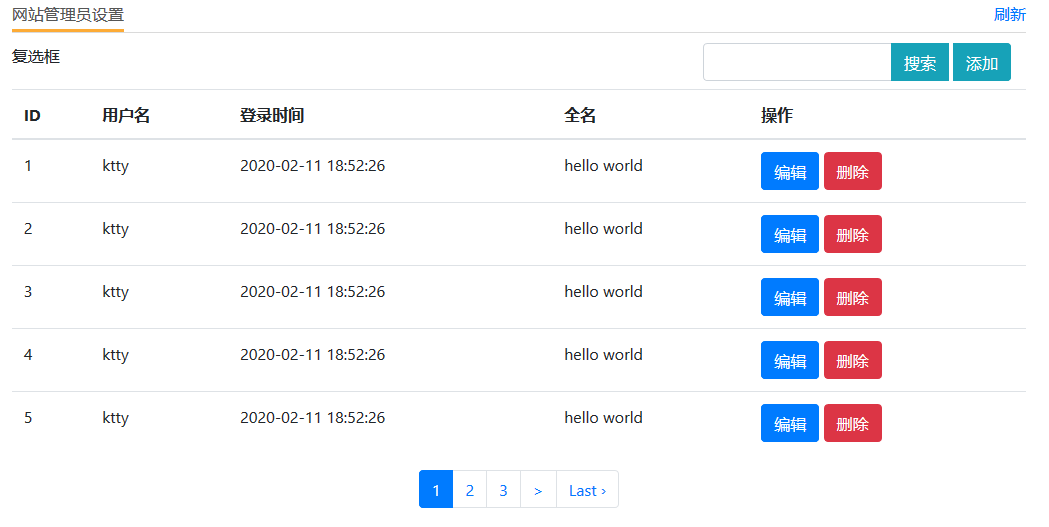
点击分页即可不刷新页面显示列表数据
之后将要实现批量删除和搜索功能
结构图
本文参考资料:
How to Create AJAX Pagination in CodeIgniter
Ajax JQuery Pagination in Codeigniter using Bootstrap
评论已关闭